Tzofar - Red Alert | צופר
- 4.4
- Rating
- 1.00M
- Installs
- Free
- Price

 Analysis by App-foxy
I installed Tzofar to see how well it works as a focused news and magazine app for alarm alerts across the country. The idea is straightforward: instead of opening a general news service and searching through headlines, this app puts attention on alerts. That narrow purpose is also its biggest strength. When the information matters immediately, a small, dedicated tool can feel more useful than a crowded feed.
My overall impression is that Tzofar is best understood as an alert companion rather than a full news replacement. It is free, aimed at everyone, and developed by RedAlert. With an average rating of 4.4 from around 2.8 thousand ratings and more than one million installs, it has clearly reached a substantial audience. I would recommend trying it if timely alarm information is relevant to your daily routine, but I would not treat it as the only source for broader news, official instructions, or personal safety decisions.
How Tzofar feels when speed matters
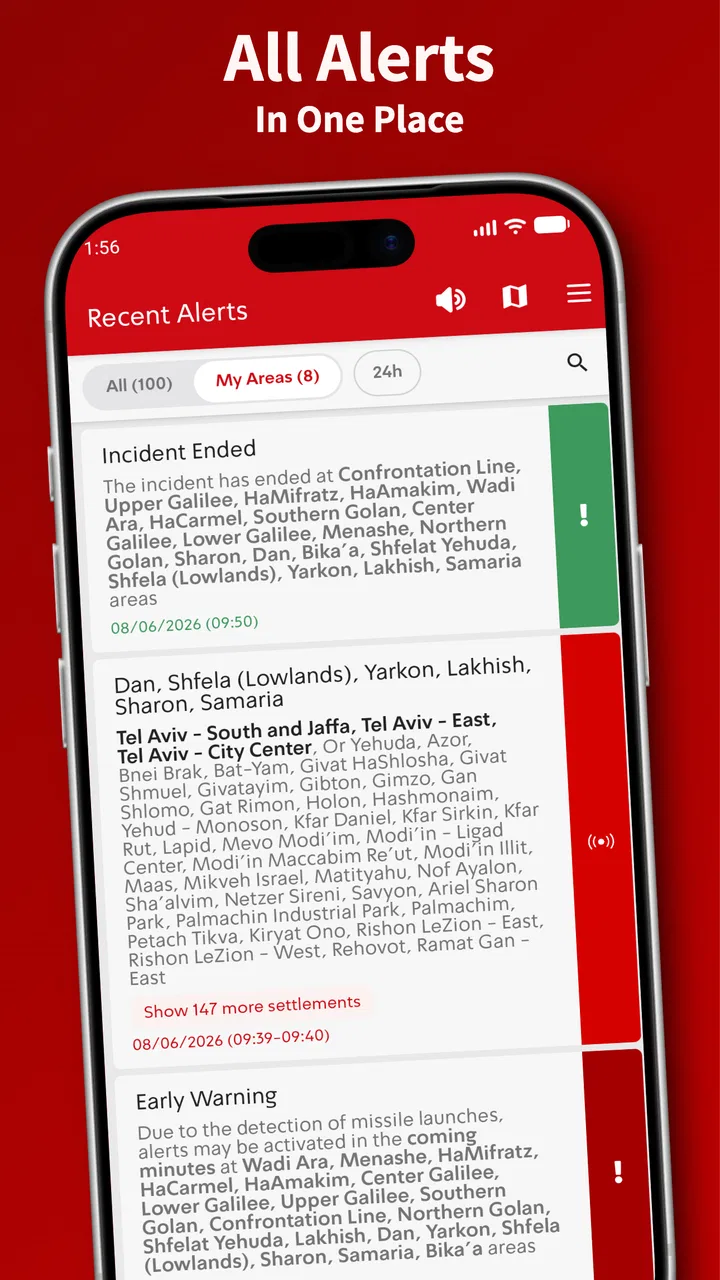
The first thing I noticed is how little effort the app demands from the user. Its purpose is not to make me browse endlessly. I open it because I want to know whether an alert has appeared, where it concerns, and what has happened recently. That focused design makes the perceived response feel more important than visual decoration. A dedicated alert app earns its place by reducing the number of steps between opening it and understanding the situation.
You May Also Like

 Blood Strike: 2.5 Anniversary
Blood Strike’s Loadouts Turn Every Drop Into a Tactical Gamble
A close look at Blood Strike’s custom loadouts: how fast access to signature weapons reshapes its battle royale rhythm, rewards preparation, and narrows the gap between fights.

 Pandora - Music & Podcasts
Pandora’s Music Is Easy to Start, but Harder to Recover
Pandora’s strength is its low-effort path from a seed to a station. Its weak spot is how much confidence it asks you to place in connection, setup, and quiet recovery.

 8 Ball Pool
 Is Built on Rivalries, Rematches, and Routine
A close look at the rivalries, rematches, shared routines, and unanswered safety questions that turn a quick pool match into a persistent mobile community.

 Samsung Music
’s Quiet Strength Is Playing What You Already Own
Its reach comes less from spectacle than from dependable access to a personal library. That simplicity is both the app’s strongest retention engine and its ceiling.

 AccuWeather: Weather Radar
AccuWeather Review: A Quick, Clear Forecast for Everyday Decisions
For everyday plans, the best forecast is the one you can understand quickly. AccuWeather makes rain timing, radar, and local conditions easy to act on, with a few trade-offs.

 Hill Climb Racing
Why Hill Climb Racing Still Turns Crashes Into One More Run
A tiny car, a bumpy hill and one more upgrade: Hill Climb Racing keeps resurfacing because its simple chaos makes every near-miss feel personal.
More From Our News Desk



In a normal day, I would expect Tzofar to be most useful when I check it briefly rather than leave it open as a constant news stream. That changes the way I judge it. I am not looking for long articles, recommendations, or a personalized magazine front page. I am looking for a quick status check. The app’s store summary describes alerts across the country, and that national scope gives it a practical role for people who travel, commute, visit family, or want awareness beyond their immediate neighborhood.
There is an important distinction between speed and certainty. An alert app can help me see information quickly, but I still need to read the location and context carefully. I would not glance at a notification and immediately assume that it applies to me. My advice is to use the app as a fast awareness layer, then follow the relevant local guidance when an alert affects your area.
A useful habit is to check Tzofar before leaving home if the day involves a long trip. That does not turn it into a route planner or a safety guarantee. It simply gives me another way to stay aware of changing conditions. For someone who wants a compact tool with a single clear job, that directness is more valuable than a large collection of unrelated news features.
A realistic daily situation
Imagine that I am preparing to travel between cities and I hear people discussing an alarm in another part of the country. A general news app may show several headlines, opinions, and older stories before I find the relevant update. With Tzofar, I can use the app for a more targeted check. I can see whether the information is relevant to my destination or route, then decide whether I need to pause, change plans, or consult official instructions.
This workflow is especially useful for people who have relatives in different areas. I may not be in the affected location myself, but I still want a quick way to understand whether an alert concerns someone I know. The app’s nationwide focus makes that kind of checking more natural than relying only on local news coverage.
At the same time, I would avoid leaving the app responsible for every decision. A notification can be missed, delayed, misunderstood, or viewed without enough context. My practical approach is to combine Tzofar with common sense, official emergency guidance, and direct communication with people in the area when necessary. That is not a criticism unique to this app; it is simply the right way to use an alert service.
What happens during heavier use
Tzofar’s workload is different from that of a video service or a social network. I would not expect it to spend long periods loading large media files or refreshing a complex content feed. Its value comes from handling short, important pieces of information and presenting them clearly. That should make the experience feel lighter than many mainstream news apps, although the importance of the information means even small moments of confusion matter.
Heavy use can mean several things here. It may mean checking repeatedly during a tense period, reviewing a sequence of alerts, or using the app while moving between areas. In those situations, the challenge is not entertainment performance. It is whether the interface remains understandable when I am distracted, worried, or in a hurry. I would pay attention to whether the latest information is easy to distinguish from earlier entries and whether locations can be read without guesswork.
One of my more useful habits with an alert-focused app is to avoid treating every opening as a full investigation. I first look for the newest relevant item, then read enough surrounding context to avoid confusing it with an earlier event. This reduces the chance of reacting to stale information. If I need a broader explanation, I switch to a trusted news source rather than expecting Tzofar to provide the complete story.
Another practical trade-off appears when I use the app alongside other emergency or news tools. Multiple sources can improve awareness, but they can also produce overlapping notifications and make it harder to know which message deserves attention. I would rather keep Tzofar’s role clearly defined: use it for alert awareness, and use other sources for detailed reporting or official instructions. That separation makes the overall setup easier to manage.
Useful habits for repeated checking
- Read the location before reacting. A national alert service may show information that is important but not immediately local to you.
- Separate current items from history. When several alerts appear close together, checking the sequence helps prevent an old item from influencing a new decision.
- Use a second source for explanation. Tzofar is more convincing as an alert tool than as a replacement for detailed journalism.
- Keep the app’s purpose narrow. If I am looking for analysis, live reporting, or general headlines, I move to a broader news app instead of forcing this one to do everything.
These habits also answer a question many users have before installing an alert app: is it useful if I am not constantly in a high-alert situation? I think it can be, particularly for people who travel across the country or have family in several regions. For someone who only wants entertainment news, sports coverage, or long-form reporting, it is probably not the right download.
Reliability, recovery, and the limits of alerts
Reliability is the area where I judge Tzofar most seriously. A news app can recover from a slow refresh with relatively little consequence. An alert app has a higher responsibility because users may open it during uncertainty. The app’s focused purpose is reassuring in one sense: there are fewer unrelated functions competing for attention. But no app should be treated as a substitute for official emergency systems or direct instructions.
When I use Tzofar, I think of it as one layer in a broader information routine. If the app opens normally, I can check the alert picture. If it does not respond as expected, I do not keep retrying indefinitely while ignoring other sources. I move to official channels and local guidance. That recovery plan is important because the safest app habit is not blind dependence; it is knowing what to do when any digital tool is unavailable.
The same principle applies to notifications. A user may reasonably want alerts to reach them without repeatedly opening the app, but notification behavior can be affected by the phone, operating system, connectivity, and battery-management choices. I would review the phone’s notification settings and avoid assuming that installing an app automatically solves every delivery problem. The app is more useful when I make sure the device itself is not silently limiting it.
I also recommend checking the app after a system update or a major phone change. This is not because Tzofar is necessarily unstable; it is a sensible recovery check for any alert-related application. I would open it, confirm that it still behaves as expected, and make sure notifications have not been disabled. That small routine is more valuable than discovering a configuration problem during an urgent moment.
The developer, RedAlert, gives the app a clear identity, and the large install base suggests that many people consider it worth keeping available. Still, popularity is not proof that every alert will arrive perfectly for every person in every situation. My honest view is that Tzofar is useful when treated as a practical supplement, not as a promise of guaranteed coverage.
Device constraints and everyday practicality
Tzofar supports Android from version 4.4 onward, which makes it accessible to people using older devices as well as newer phones. That broad compatibility is helpful for an app whose purpose is basic access to important information. Someone does not necessarily need a recent flagship phone to find value in a focused alert tool.
Older hardware can still create a different experience from a modern device. App opening, background behavior, notification handling, and network recovery may feel less consistent on a phone with limited memory or an aging battery. I would not judge the app only by how it behaves on a new phone. If I were using an older handset, I would keep enough free storage, avoid aggressive battery restrictions for the app, and test it during ordinary conditions rather than waiting for an emergency.
There is also a connectivity trade-off. An alert application depends on the phone being able to receive and process information. Weak mobile coverage, an unreliable Wi-Fi connection, airplane mode, or a phone that has been powered off can all affect usefulness. Tzofar cannot remove those physical limitations. For that reason, I would not install it and then stop thinking about other ways to receive urgent instructions.
The app is free, which removes the most obvious barrier to trying it. It is also rated for everyone, so its intended audience is broad rather than limited to a specialist group. Those details make it easy to recommend as a low-commitment addition to a phone, especially for families or people who want a dedicated alert reference without paying for another subscription.
Still, free and accessible does not mean universally suitable. A person who wants a polished, all-in-one news experience may find Tzofar too narrow. A person who needs detailed regional reporting, explanations, maps, or live commentary may prefer a broader service. I would choose Tzofar when the priority is alert awareness, not when the priority is a complete daily news magazine.
Version, maturity, and what to expect
The current version is 20.6.7, and the app has been available since February 8, 2020. That gives it a meaningful history rather than the feel of a brand-new experiment. I like seeing an alert tool with an established presence because this kind of app needs to fit into real routines over time, not merely make a strong first impression.
Even so, I would keep expectations realistic. A version number does not tell me that every device will behave identically, nor does it guarantee that the app will replace official channels. I see the current release as a reason to try the app and evaluate it on my own phone, especially if alerts are personally relevant. After installing, I would spend a few minutes learning where the latest information appears and how I can recognize older entries.
One non-obvious advantage of this preparation is psychological: familiarity reduces hesitation. If I only open an alert app for the first time during a stressful event, I am more likely to misread the screen or waste time searching. A calm first check lets me understand the app’s rhythm before I need it. That is a simple but worthwhile use case that a short store summary cannot communicate.
Who should use it and who should choose something else
I would recommend Tzofar to people who want a dedicated way to follow alarm information across the country, commuters who cross regional boundaries, families with relatives in different locations, and users who prefer a focused tool over a busy news feed. Its free access and broad Android compatibility make experimenting with it easy.
I would be more cautious about recommending it as the sole information source to someone responsible for making urgent safety decisions. That person should have official guidance available and should understand that an app is only one part of an emergency-information setup. I would also steer away users who mainly want general headlines, investigative reporting, entertainment, or personalized magazine content. They will probably get more value from a full news application.
Compared with a general news app, Tzofar should feel more purposeful because it does not need to compete with unrelated stories for attention. Compared with official emergency channels, it is better viewed as a convenient additional interface rather than an authority that replaces them. Compared with manually checking websites or social feeds, a dedicated app can reduce searching, but it still requires careful reading and sensible backup habits.
My strongest practical recommendation is to decide what role the app will play before installing it. If the role is “help me notice and review alarm information,” Tzofar makes sense. If the role is “tell me everything happening in the country and explain what it means,” I would choose a broader news service and keep Tzofar only as a focused supplement. That clear division prevents disappointment and makes the app easier to trust appropriately.
My performance verdict
After using Tzofar as a focused news and magazine app, I see its main achievement in its restraint. It is built around a specific need: awareness of alarms across the country. That makes it easier to justify than a general news app when I want a quick, dedicated check. The large user base, 4.4 average rating, free price, and Everyone age rating all support the impression that it is approachable for a wide audience.
My verdict is positive, with an important condition: use it as one part of your information routine. I appreciate the direct purpose, the support for older Android devices, and the practical value for people who need nationwide awareness. I also appreciate that it can complement broader news sources instead of forcing me to search through unrelated headlines.
The limitations are equally clear. An alert app is not a complete news service, not a guarantee of delivery, and not a replacement for official instructions. Device settings, connectivity, and the user’s ability to interpret locations still matter. During heavy alert activity, I would take extra care to distinguish current information from history and avoid reacting to a headline without checking its relevance.
If alarms and regional awareness are part of your everyday concerns, I think Tzofar is worth installing and learning in advance. Spend a quiet moment becoming familiar with its presentation, keep your phone’s notification settings in order, and maintain an official backup source. Used that way, Tzofar is a sensible, focused alert companion rather than an overloaded news platform, and that focused role is exactly why I would recommend it to the right person.
FAQs for Tzofar - Red Alert | צופר
01What is the main purpose of Tzofar - Red Alert?
Tzofar - Red Alert is designed to provide real-time alerts and notifications about incoming threats or emergencies, specifically focusing on security situations in Israel. The app aims to keep users informed and safe by promptly delivering alerts directly to their devices, allowing them to take necessary precautions.
02How does Tzofar - Red Alert deliver notifications?
The app utilizes push notifications to deliver real-time alerts to users. Once installed, it continuously monitors for any security threats and sends alerts as soon as they are detected. Users can customize notification settings to ensure they receive alerts in a manner that suits their preferences, including sound and vibration options.
03Is Tzofar - Red Alert free to use, and are there any in-app purchases?
Yes, Tzofar - Red Alert is free to download and use. There are no mandatory in-app purchases, which makes it accessible to a wide range of users. However, there might be optional features or donations available to support the app's development and maintenance.
04Can Tzofar - Red Alert be used outside of Israel?
While Tzofar - Red Alert is primarily designed for users in Israel, the app can be installed and used globally. However, its main functionality focuses on Israeli security alerts, so users outside the region may not find the alerts relevant unless they have specific interests or connections to Israel.
05What are the system requirements for installing Tzofar - Red Alert?
Tzofar - Red Alert is available for both Android and iOS devices. For Android users, the app requires version 5.0 and up, while iOS users need version 10.0 or later. It is compatible with both smartphones and tablets, ensuring broad accessibility for those in need of timely alerts.
Pros
- Real-time alerts keep users informed instantly.
- Simple interface for quick navigation.
- Customizable alert settings for personal needs.
- Low battery consumption during operation.
- Available in multiple languages for wider reach.
Cons
- Requires internet for real-time updates.
- May cause anxiety with frequent alerts.
- Limited support for older devices.
- Some users report occasional lag.
- Not all regions are covered in alerts.

Tzofar - Red Alert | צופר
Gallery